AI’s programming capabilities are outpacing our ability to harness them. That’s why all the frantic efforts to boost SWE-bench scores aren’t aligning with the productivity metrics engineering leaders actually care about. The Anthropic team launched Cowork in 10 days, while another team using the same model can’t even get a POC (Proof of Concept) off the ground—the difference is that one team has bridged the gap between capability and practice, while the other hasn’t.
This gap won’t disappear overnight; it narrows in levels. Eight levels in total. Most people reading this have probably passed the first few levels, and you should be eager to reach the next—because each level up means a huge leap in output, and every improvement in model capability further amplifies these gains.
Another reason you should care is the multiplayer effect. Your output depends more on your teammates’ levels than you think. Suppose you’re a Level 7 expert, with background agents submitting several PRs for you while you sleep. But if your repository requires a colleague’s approval to merge, and that colleague is stuck at Level 2, still manually reviewing PRs, your throughput is bottlenecked. So helping your teammates level up benefits you too.
Through conversations with many teams and individuals about their practices using AI-assisted programming, here is the level progression path I’ve observed (the order isn’t strictly absolute):
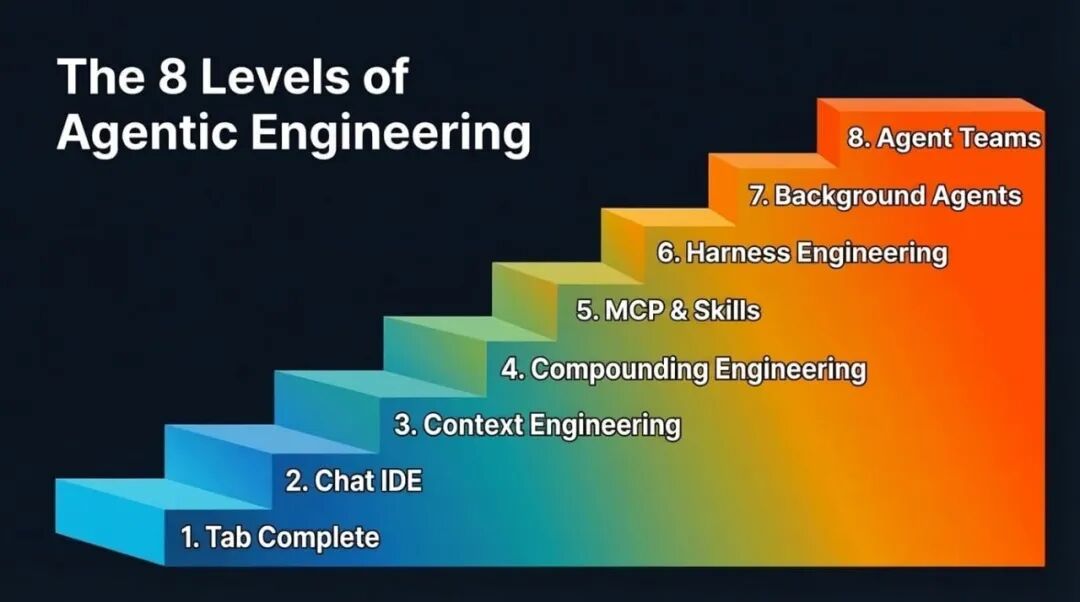
The 8 Levels of Agentic Engineering
Levels 1 & 2: Tab Completion & Agentic IDEs
I’ll go through these two levels quickly, mainly for completeness. Feel free to skim.
Tab completion is where it all started. GitHub Copilot kicked off this movement—press Tab, autocomplete code. Many may have long forgotten this stage, and newcomers might have skipped it entirely. It’s more suitable for experienced developers who can first build the code skeleton and then let AI fill in the details.
AI-native IDEs, represented by Cursor, changed the game by connecting chat to the codebase, making cross-file editing much easier. But the ceiling is always context. The model can only help with what it can see, and the frustrating part is that it either doesn’t see the right context or sees too much irrelevant context.
Most people at this level are also experimenting with the plan mode of their chosen programming agent: turning a rough idea into a structured step-by-step plan for the LLM, iterating on that plan, and then triggering execution. It works well at this stage and is a reasonable way to maintain control. However, as we’ll see in later levels, reliance on plan mode decreases.
Level 3: Context Engineering
Now we get to the interesting part. Context Engineering is the buzzword of 2025. It became a concept because models can finally reliably follow a reasonable amount of instructions with just the right context. Noisy context is as bad as insufficient context, so the core work is increasing the information density per token. “Every token must fight for its place in the prompt”—that was the creed back then.
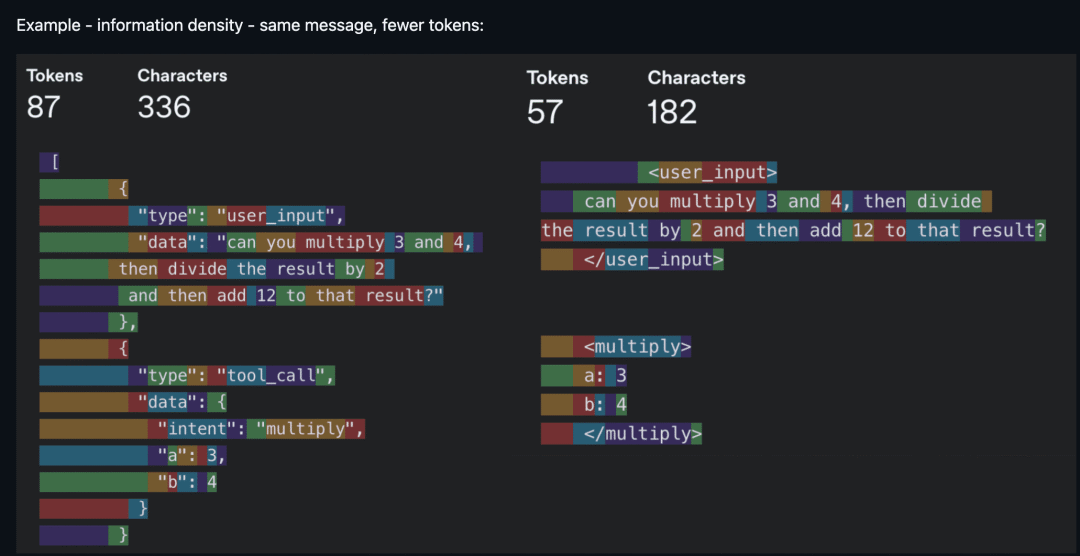
Same information, fewer tokens—information density is king (Source: humanlayer/12-factor-agents)
In practice, context engineering is broader than most realize. It includes your system prompts and rule files (.cursorrules, CLAUDE.md). It includes how you describe tools because the model reads these descriptions to decide which tool to call. It includes managing conversation history to avoid long-running agents getting lost after the tenth round. It also includes deciding which tools to expose each round because too many options overwhelm the model—just like people.
You don’t hear much about context engineering these days. The scales have tipped towards models that tolerate noisier context and can reason in messier scenarios (larger context windows help too). But being mindful of context consumption still matters. It remains a bottleneck in several scenarios:
-
• Smaller models are more sensitive to context. Voice applications often use smaller models, and context size also relates to first-token latency, affecting response speed. -
• Token hogs. MCPs (Model Context Protocol) like Playwright and image inputs quickly consume tokens, pushing you into “compressed session” state in Claude Code sooner than expected. -
• Agents with dozens of integrated tools, where the model spends more tokens parsing tool definitions than doing actual work.
The broader point is: context engineering hasn’t disappeared; it’s evolving. The focus has shifted from filtering out bad context to ensuring the right context appears at the right time. And it’s this shift that paves the way for Level 4.
Level 4: Compounding Engineering
Context engineering improves *this* session. Compounding Engineering[1] (coined by Kieran Klaassen) improves *every* session thereafter. This idea was a turning point for me and many—it made us realize that “programming by feel” is far more than just prototyping.
It’s a “Plan, Delegate, Evaluate, Codify” loop. You plan the task, give the LLM enough context to succeed. You delegate. You evaluate the output. Then the crucial step—you codify what you learned: what worked, what went wrong, what patterns to follow next time.
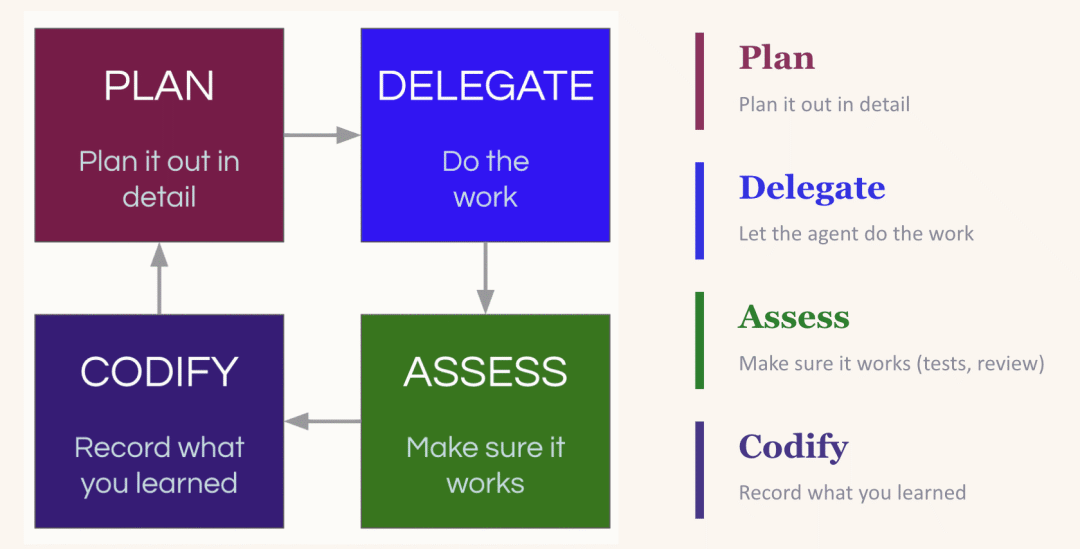
The Compounding Loop: Plan, Delegate, Evaluate, Codify—each round makes the next better
The magic is in the “codify” step. LLMs are stateless. If it reintroduced a dependency you explicitly removed yesterday, it’ll do it again tomorrow—unless you tell it not to. The most common fix is updating your CLAUDE.md (or equivalent rule file), baking lessons into every future session. But beware: the impulse to stuff everything into the rule file can backfire (too many instructions equals no instructions). A better approach is creating an environment where the LLM can easily discover useful context itself—like maintaining an up-to-date <code style="font-size: 90%;color: #d14;background: rgba(27, 31, 35, 0.05);padding: 3px 5px;border-radius: