Feishu just open-sourced a command-line tool called lark-cli, which allows AI Agents to directly operate Feishu: send messages, check calendars, write documents, create multi-dimensional tables, send emails, and manage tasks. You give the AI a command, and it goes to operate Feishu to complete the task.
There are many similar CLIs. Three weeks ago, Google also open-sourced gws, allowing AI Agents to operate Google Workspace. It’s 2026, and all products wanting to integrate with AI Agents are building CLIs.
CLI (Command Line Interface) is when you open a terminal window with a black background and white text on your computer, type a command, press Enter, and the computer does the work for you.
For example, to check today’s schedule, instead of opening the Feishu app to find the calendar, you type:
lark-cli calendar +agendaAnd the schedule is listed.
No buttons, no icons, no fancy interface. CLIs predated graphical interfaces by over two decades and gradually fell out of use during the Windows era. But in the AI Agent era, they’re making a comeback.
Why Is Everyone Building CLIs in the AI Agent Era?
For an AI Agent to work, it needs the ability to operate tools. If you ask an AI to book a meeting room for you, it needs access to the calendar system. If you ask it to organize customer data, it needs to read and write spreadsheets. If you ask it to deploy code, it needs to run deployment commands.
There must be an interface for the AI to call. APIs can also do this, but CLIs have one advantage APIs don’t:CLIs are self-describing. When an AI encounters an unfamiliar CLI, it can type --help to learn about its capabilities, how to use it, and how to fill in parameters. APIs can’t do this; the AI must first obtain documentation, understand endpoints, and figure out authentication methods before it can proceed. CLIs come with built-in manuals; the AI can use them right away.
Moreover, CLIs naturally interact via text—input is text, output is text. Text is what AI is best at processing. Conversely, having AI operate a GUI is more roundabout: it requires screenshots, using vision models to identify button locations, and simulating mouse clicks. What could be done with one command is broken into four steps, each prone to error. For AI, CLI is the natural operating interface.
What About MCP and Skills?
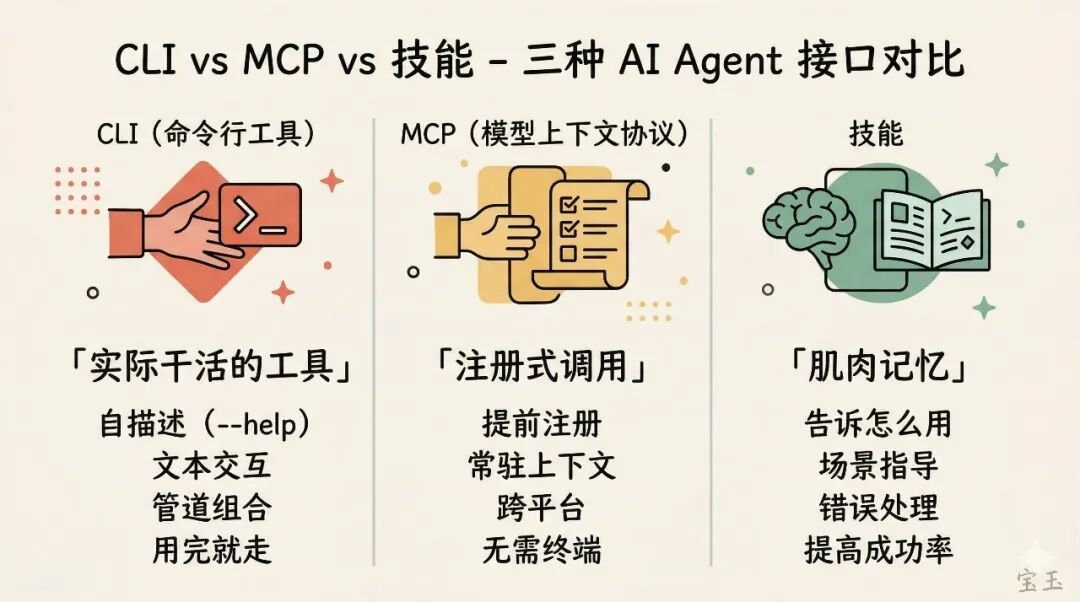
There are currently three mainstream ways to let AI Agents operate external services: MCP, CLI, and Skills. They are not mutually exclusive; each handles a different aspect.
CLI is the actual tool that does the work. After installation, you can run commands in the terminal—check calendars, send messages, create tables—all executed by the CLI.
MCP also allows AI to operate external services, but in a different way. MCP pre-registers a list of tools with the AI, which the AI can call at any time. However, this list itself permanently occupies the context window (think of it as the AI’s “working memory,” which has limited space). Even if the AI temporarily doesn’t use a tool, its description still takes up space. With a CLI, the AI goes to the terminal to type commands when needed, and leaves when done, without occupying context.
Another difference is composability. CLIs can combine pipes and parameters to perform operations not pre-defined. For example:
lark-cli calendar agenda --next-week | grep "Zhang San" | wc -lOne command can find out how many meetings you have with Zhang San next week. With MCP, each capability needs to be pre-registered; to achieve the same effect, a new tool would need to be defined separately.
However, MCP has its own suitable scenarios. In environments that don’t support command lines (like Cursor, Claude desktop), MCP is the only choice. Each has its strengths: use CLI for lightweight flexibility in terminal-accessible scenarios, and rely on MCP for non-terminal scenarios.
Skills are the instruction manual for the Agent. They don’t do the work, but tell the Agent what commands the CLI has, what parameters to use in which scenarios, and how to handle errors. An Agent can use a CLI without a skill file by exploring with --help. With a skill file, the Agent knows exactly how to operate from the start, resulting in a much higher success rate.
Simply put:CLI is the hand, MCP is another type of hand, and Skills are muscle memory. Feishu’s open-source project this time provides both the CLI and the skills.
How to Write a Good CLI for AI
Not just any command-line tool can be used smoothly by AI. If you want to build an AI-oriented CLI for your product, Feishu’s design has several noteworthy points.
First, the help text is your most important documentation. When an AI encounters an unfamiliar CLI, the first thing it does is run --help. Your help text is the combined tool manual, parameter specifications, and usage guide. Don’t write help info that just says Usage: myctl deploy [flags] and be done. Clearly state what each parameter does, when to use it, and what its default value is. Feishu CLI also has a <code style="font-size: 90%;color: #d14;background: rgba(