Guide
The author of this article, Thariq Shihipar (@trq212), is an engineer on Anthropic’s Claude Code team and one of the core promoters of the Skills feature. Before joining Anthropic, he co-founded the open-source academic publishing platform PubPub during his graduate studies at the MIT Media Lab and later participated in Y Combinator (W20 batch). He frequently shares firsthand experience with Claude Code and updates on new features on X.
The value of this article lies in: it is a practical summary from Anthropic’s internal team. There are already hundreds of Skills actively used within Anthropic, and the classification system and writing techniques in this article are distilled from these real internal practices.
If you are already using Claude Code but haven’t seriously worked on Skills, this article can help you establish a systematic approach: what types of Skills to create, how to write them, and how to promote them within your team.
Skills have become one of the most widely used extension points in Claude Code. They are flexible, easy to create, and simple to distribute.
But precisely because they are so flexible, it’s hard to know how to use them best. What types of Skills are worth creating? What’s the secret to writing a good Skill? When should you share them with others?
We use Claude Code’s Skills extensively within Anthropic, with hundreds currently in active use. Here are the lessons we’ve learned from using Skills to accelerate development.
What are Skills?
If you’re not familiar with Skills, we recommend first checking our documentation[1] or the latest Skilljar course on Agent Skills[2]. This article assumes you already have a basic understanding of Skills.
We often hear a misconception that Skills are “just markdown files.” But the most interesting thing about Skills is precisely that they are not just text files—they are folders that can contain scripts, resource files, data, and more, which agents can discover, explore, and use.
In Claude Code, Skills also have rich configuration options[3], including registering dynamic hooks.
We’ve found that the most interesting Skills in Claude Code are often those that creatively leverage these configuration options and folder structures.
Types of Skills
After reviewing all our Skills, we noticed they can roughly be categorized into several recurring types. The best Skills clearly fall into one category; confusing Skills often span several. This is not an exhaustive list, but it’s a good starting point if you want to check what types of Skills your team might be missing.
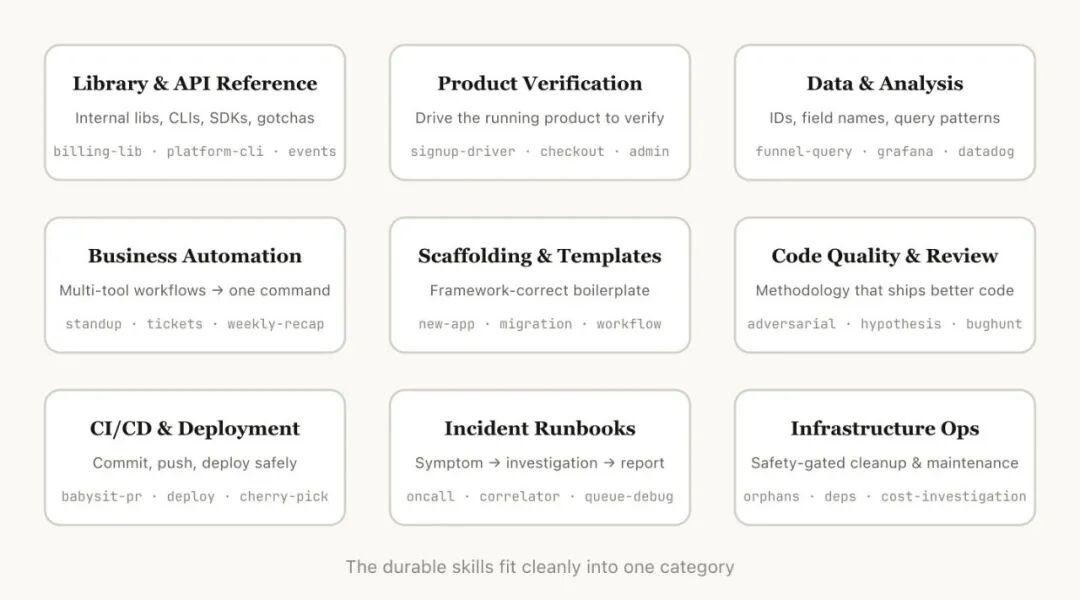
1. Libraries & API References
Skills that help you correctly use a library, command-line tool, or SDK. They can target internal libraries or common libraries that Claude Code occasionally gets wrong. These Skills typically include a folder of reference code snippets and a list of gotchas that Claude should avoid when writing code.
Examples:
-
• billing-lib — Your internal billing library: edge cases, footguns, etc. -
• internal-platform-cli — Each subcommand of your internal CLI tool and example usage scenarios -
• frontend-design — Helps Claude better understand your design system
2. Product Validation
Skills that describe how to test or validate that code works correctly. Often paired with external tools like Playwright, tmux, etc., to complete the validation.
Validation Skills are very useful for ensuring the correctness of Claude’s output. It’s worth having an engineer spend a week specifically refining your validation Skills.
Consider techniques like having Claude record a video of the output process so you can see what it actually tested; or enforcing programmatic state assertions at each step. These are typically implemented by including various scripts in the Skill.
Examples:
-
• signup-flow-driver — Runs through signup → email verification → onboarding flow in a headless browser, with hooks to insert state assertions at each step -
• checkout-verifier — Drives checkout UI with Stripe test cards, verifies invoices end up in the correct state -
• tmux-cli-driver — For interactive command-line tests requiring a TTY
3. Data Fetching & Analysis
Skills that connect to your data and monitoring systems. These Skills might include data-fetching libraries with credentials, specific dashboard IDs, etc., along with instructions for common workflows and data fetching methods.
Examples:
-
• funnel-query — “Which events need to be correlated to see signup → activation → paid conversion?”, plus the actual table containing the canonical user_id -
• cohort-compare — Compare retention or conversion rates between two user groups, flag statistically significant differences, link to cohort definitions -
• grafana — Data source UIDs, cluster names, issue → dashboard mapping table
4. Business Processes & Team Automation
Skills that automate repetitive workflows into a single command. These Skills usually have simple instructions but may depend on other Skills or MCP (Model Context Protocol). For these Skills, saving previous execution results in log files helps the model maintain consistency and reflect on prior executions.
Examples:
-
• standup-post — Summarizes your task tracker, GitHub activity, and previous Slack messages → generates formatted standup report, delta-only -
• create-<ticket-system>-ticket — Enforces schema (valid enum values, required fields) plus post-creation workflow (notify reviewer, post link in Slack) -
• weekly-recap — Merged PRs + closed tickets + deployment records → formatted weekly report
<h2 data-heading="true