The source code for Claude Code has been leaked, and the internet is flooded with “in-depth analysis” articles. Some friends have also asked me to write an analysis piece. However, the code has only been out for a dozen hours, and with over 500,000 lines, conducting a thorough analysis is quite challenging. But rather than just giving you a fish, it’s better to teach you how to fish. I’d rather discuss:How to truly learn from a piece of open-source code once you get your hands on it.
This methodology isn’t just for Claude Code; it applies to any large open-source project.
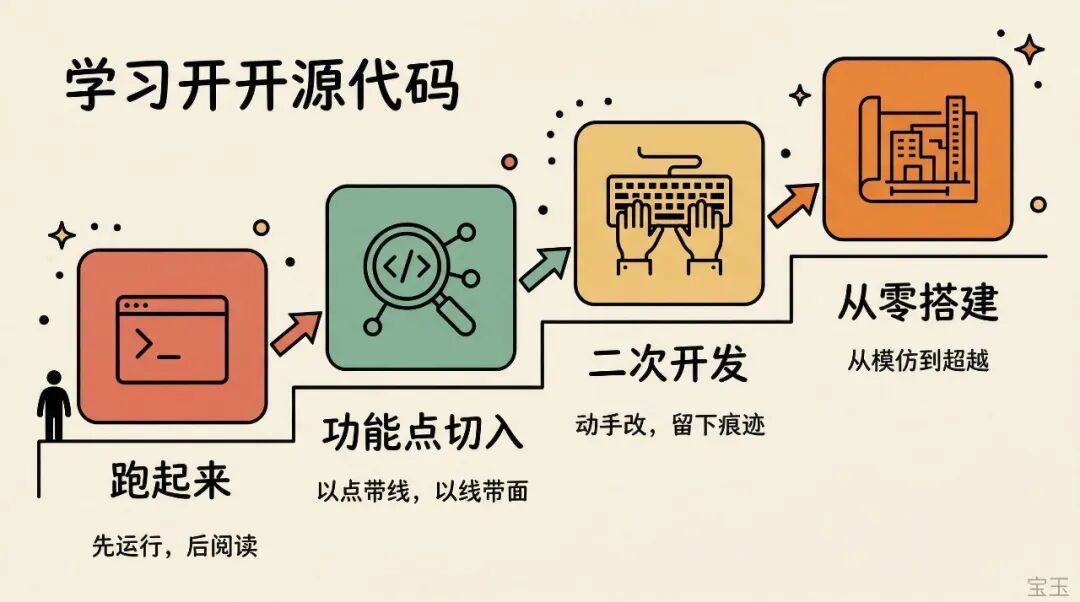
After getting the source code, most people’s first instinct is to open the files and start reading.
Hold on. Get it running first.
The leaked Claude Code is the result of source map restoration, missing a lot of scaffolding and private packages, so it can’t be run directly. I was planning to figure it out myself, but I found someone has already done it (https://github.com/claude-code-best/claude-code). Just use that.
Note: I don’t know the author of this project. I’m recommending it because I could download and run it normally. I’m not sure about its future development, and there’s a high chance it will be taken down. If you’re interested, download the code to your local machine as soon as possible and have an AI analyze it for security issues before running it.
Why is running it essential? Two reasons.
First, you can see the results directly.Code is dead; it only comes alive when it runs. When reading code, you might think, “This function probably does this.” Running it confirms if you’re right.
Second, you can add logs and set breakpoints. This is the core technique for analyzing specific functionalities later. Trying to find logic by just looking at tens of thousands of lines of code is like looking for a needle in a haystack. Once it’s running, add a console.log, and the code will tell you what it’s doing.
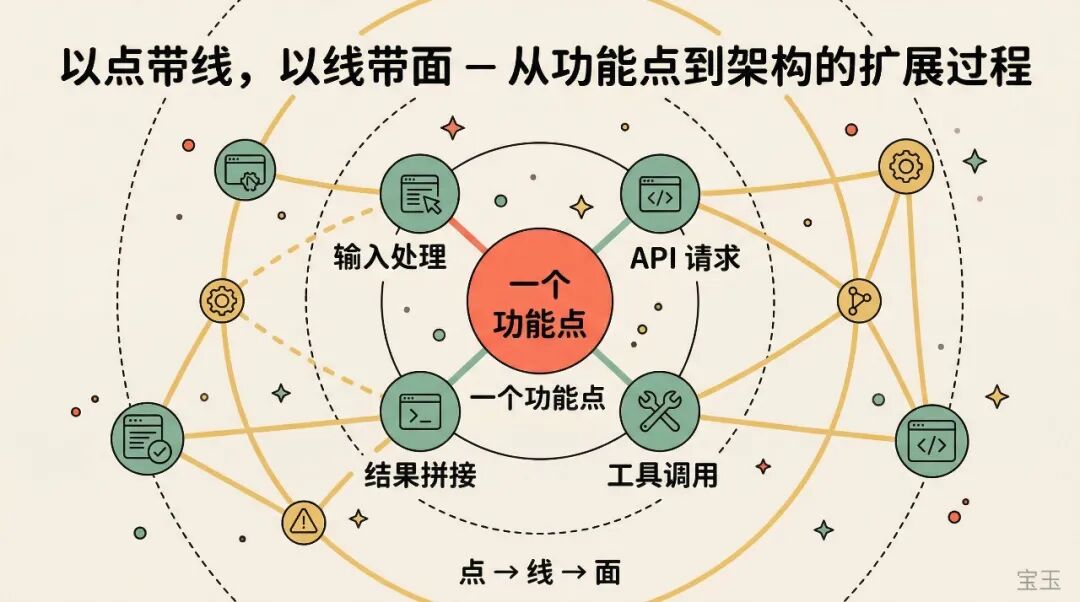
Step Two: Start with a Point, Extend to a Line, Then Cover the Surface
Once the project is running, many people make a mistake next: trying to read the entire project from the entry file, cover to cover.
With tens of thousands of lines, you’ll give up in three days reading like that.
A better approach is to start with a specific feature.
For example, if you’re interested in the Agent Loop. Then print or collect all API requests, see what the Prompt sent to the model looks like, what the model returns, and what Claude Code does after getting the response. After one round of conversation, you’ll have an intuitive understanding of “how an Agent decomposes tasks and calls tools.”
I used to do similar things with claude-trace, but unfortunately, it’s no longer usable. Now with the source code, you can add logs yourself for even more detail.
Once you understand one feature, you’ll naturally encounter the modules it passes through: how input comes in, what processing it undergoes, how tool calls are triggered, how results are assembled. The relationships between modules are connected one by one this way.
Don’t be greedy.Thoroughly understanding one feature is far more useful than skimming ten modules.
Step Three: Start Modifying, Leave Your Mark on the Code
Just reading code, what you learn easily becomes “feeling like you understand.” The truth is revealed once you start doing.
But there’s no need to write from scratch either. For a mature project, the best way to practice is through secondary development.
For example, Claude Code just released a /buddy command that gives you a little pet. You can try implementing a similar slash command yourself, or add some new twists. Another example is Claude Code’s memory function. You can study how it stores and retrieves memories, then try implementing a memory mechanism yourself. Its architecture is relatively stable already; you just need to fill in the logic within the existing framework, so the entry barrier isn’t actually high.
When doing secondary development, try not to use AI assistance.

I know this sounds counterintuitive. Using AI to write code is so much more efficient, why not use it? Because the goals are different. Your goal is learning, not delivery. If you let AI write it for you, you’re skipping precisely the most valuable thinking process: Why is the code organized this way? Why is this module placed here? Why is the interface designed like this?
When you can develop a feature from start to finish on your own, your understanding of the project shifts from “seen” to “done.”
After doing a few features, you’ll become increasingly familiar with its entire architecture, even starting to feel some areas could be improved.
That’s exactly right.
Step Four: From Imitation to Surpassing
<span leaf